B34nK0

技术永不过期

0%

python库打包与发布 setup

概要

简要介绍如何打包自己的python库并进行发布,主要工具为python 库 ‘setuptools`

from setuptools import setup

常用的分发方式

  • tar.gz格式:
    这个就是标准压缩格式,里面包含了项目元数据和代码,可以使用Python setup.py sdist命令生成。
  • egg格式:
    这个本质上也是一个压缩文件,只是扩展名换了,里面也包含了项目元数据以及源代码。这个格式由setuptools项目引入。 可以通过命令Python setup.py bdist_egg命令生成。
  • whl格式:
    这个是Wheel包,也是一个压缩文件,只是扩展名换了,里面也包含了项目元数据和代码,还支持免安装直接运行。 whl分发包内的元数据和egg包是有些不同的。这个格式是由PEP 427引入的。可以通过命令Python setup.py bdist_wheel生成。

我们主要介绍 whl 格式,这也是当前主流的方式。

我的目录结构
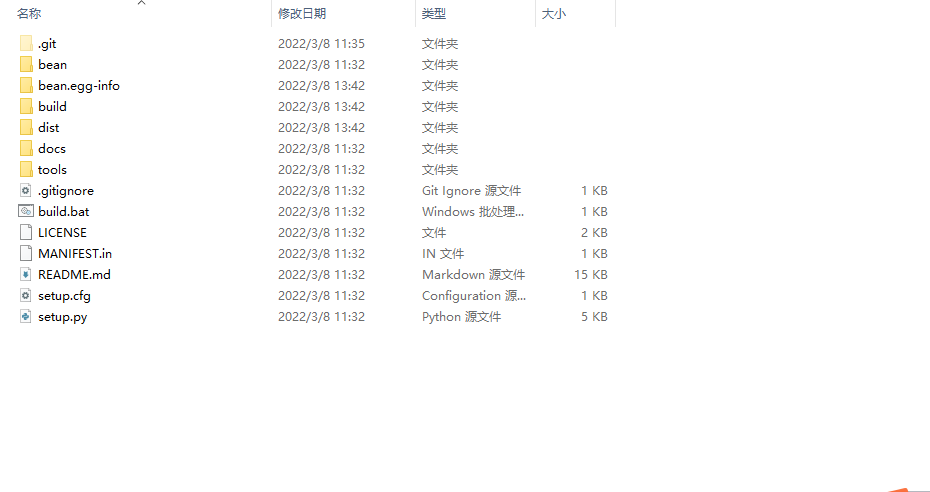
编写setup.py文件

1
2
3
4
5
6
7
8
9
10
11
12
13
14
15
16
17
18
19
20
21
22
23
24
25
26
27
28
29
30
31
32
33
34
35
36
37
38
39
40
41
42
43
44
45
46
47
48
49
50
51
52
53
54
55
56
57
58
59
60
61
62
63
64
65
66
67
68
69
70
71
72
73
74
75
76
77
78
79
80
81
82
83
84
85
86
87
88
89
90
91
92
93
94
95
96
97
98
99
100
101
102
103
104
105
106
107
108
109
110
111
112
113
114
115
116
117
118
119
120
121
122
123
124
125
126
127
128
129
130
131
132
133
134
135
136
137
138
139
140
141
142
143
144
145
146
147

#!/usr/bin/env python
# -*- coding: utf-8 -*-

# Note: To use the 'upload' functionality of this file, you must:
# $ pipenv install twine --dev

import io
import os
import sys
from shutil import rmtree

from setuptools import find_packages, setup, Command, Distribution

# Package meta-data.
NAME = 'bean'
DESCRIPTION = 'Python Sub Framework Of bean'
URL = 'xxx'
EMAIL = 'beanch1n4@foxmail.com'
AUTHOR = 'bean'
REQUIRES_PYTHON = '>=3.5.0'
VERSION = '0.8.0'

# What packages are required for this module to be executed?
REQUIRED = [
'numpy',
'pandas',
'xlsxwriter',
'flask==1.1.2',
'flask_socketio==4.3.1',
'pyquery',
'flask-compress',
'psutil',
'chardet'
]

# What packages are optional?
EXTRAS = {
# 'fancy feature': ['django'],
}

# The rest you shouldn't have to touch too much :)
# ------------------------------------------------
# Except, perhaps the License and Trove Classifiers!
# If you do change the License, remember to change the Trove Classifier for that!

here = os.path.abspath(os.path.dirname(__file__))

# Import the README and use it as the long-description.
# Note: this will only work if 'README.md' is present in your MANIFEST.in file!
try:
with io.open(os.path.join(here, 'README.md'), encoding='utf-8') as f:
long_description = '\n' + f.read()
except FileNotFoundError:
long_description = DESCRIPTION

# Load the package's __version__.py module as a dictionary.
about = {}
if not VERSION:
project_slug = NAME.lower().replace("-", "_").replace(" ", "_")
with open(os.path.join(here, project_slug, '__version__.py')) as f:
exec(f.read(), about)
else:
about['__version__'] = VERSION

class BinaryDistribution(Distribution):
"""Distribution which always forces a binary package with platform name"""
def has_ext_modules(foo):
return True

class UploadCommand(Command):
"""Support setup.py upload."""

description = 'Build and publish the package.'
user_options = []

@staticmethod
def status(s):
"""Prints things in bold."""
print('\033[1m{0}\033[0m'.format(s))

def initialize_options(self):
pass

def finalize_options(self):
pass

def run(self):
try:
self.status('Removing previous builds…')
rmtree(os.path.join(here, 'dist'))
except OSError:
pass

self.status('Building Source and Wheel (universal) distribution…')
os.system('{0} setup.py sdist bdist_wheel --universal'.format(sys.executable))

self.status('Uploading the package to PyPI via Twine…')
os.system('twine upload dist/*')

self.status('Pushing git tags…')
os.system('git tag v{0}'.format(about['__version__']))
os.system('git push --tags')

sys.exit()


# Where the magic happens:
setup(
name=NAME,
version=about['__version__'],
description=DESCRIPTION,
long_description=long_description,
long_description_content_type='text/markdown',
author=AUTHOR,
author_email=EMAIL,
python_requires=REQUIRES_PYTHON,
url=URL,
packages=find_packages(),
# If your package is a single module, use this instead of 'packages':
#py_modules=['py'],

# entry_points={
# 'console_scripts': ['mycli=mymodule:cli'],
# },
install_requires=REQUIRED,
package_data={"": [
"*"
]},
extras_require=EXTRAS,
include_package_data=True,
license='MIT',
classifiers=[
# Trove classifiers
# Full list: https://pypi.python.org/pypi?%3Aaction=list_classifiers
'License :: OSI Approved :: MIT License',
'Programming Language :: Python',
'Programming Language :: Python :: 3',
'Programming Language :: Python :: Implementation :: CPython',
'Programming Language :: Python :: Implementation :: PyPy'
],
# $ setup.py publish support.
cmdclass={
'upload': UploadCommand,
},
)

说明:

  • name -> 为项目名称,和顶层目录名称一致;
  • version -> 是项目当前的版本
  • description -> 是包的简单描述,这个包是做什么的
  • long_description -> 这是项目的详细描述,出现在pypi软件的首页上
  • url -> 为项目访问地址,我的项目放在github上。
  • author -> 为项目开发人员名称
  • author_email -> 为项目开发人员联系邮件
  • license -> 为本项目遵循的授权许可
  • classifiers -> 有很多设置,具体内容可以参考官方文档
  • keywords -> 是本项目的关键词,理解为标签
  • packages -> 是本项目包含哪些包,使用工具函数自动发现包
  • package_data -> 通常包含与包实现相关的文件
  • data_files -> 指定其他的一些文件(如配置文件)
  • cmdclass -> build或install的时候执行的额外操作
  • entry_points -> 可以定义安装该模块后执行的脚本,比如将某个函数作为linux命令

setup.cfg用于提供setup.py的默认参数

1
2
3
[bdist_wheel]
universal=0
python-tag=py3

MANIFEST.in定义打包时需要包含的文件

include README.md LICENSE

可以看到我们项目里的README及LICENSE

项目打包

build.bat批处理文件
python setup.py sdist bdist_wheel

执行后再顶层目录生成了

dist \bean.egg-info \ build文件

注册PyPI帐号

如果没有账号需要先在PyPI网站上注册账号。 在您的本机用户下创建~/.pypirc文件,此文件中配置PyPI访问地址和账号。下面是我的.pypirc文件内容请根据自己的账号来修改。

`
[distutils]
index-servers = pypi

[pypi]
repository=http://pypi.python.org/pypi
username=bean
password=********
`

注册项目

python setup.py register

上传项目

python setup.py sdist bdist_wheel upload